Skymate: A Handwritten Font for Engaging Web Designs
As a web designer, I recently embarked on a project to revamp a boutique online store. The goal was to create a more engaging and visually appealing experience that would resonate with the brand's creative and friendly personality. One of the key elements in achieving this was selecting the right font. Enter Skymate, a handwritten font that brings a unique and inviting touch to any digital layout.
Visual Characteristics and Personality of Skymate
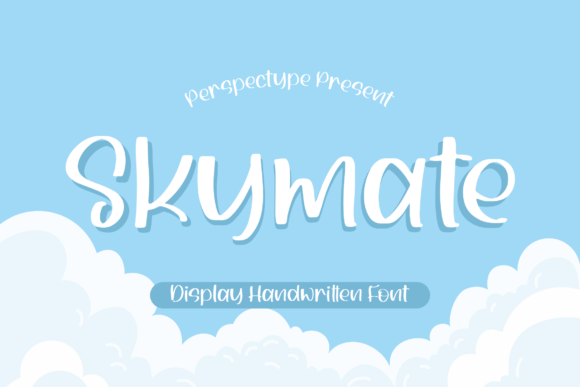
Skymate is a delightful and playful handwritten font. Its casual, yet refined style makes it perfect for adding a personal and approachable feel to any design. The font's smooth curves and natural flow give it a hand-drawn aesthetic, which can help humanize a brand and make it more relatable to its audience.
Testing Skymate in a Hero Section
The first area I tested Skymate in was the hero section of the website. I wanted to see how it would look as the main headline, set against a high-quality image of the store's products. The result was impressive. The font's organic and friendly appearance complemented the image perfectly, creating a welcoming and engaging first impression.
Using Skymate for Headers and Call-to-Action Areas
Beyond the hero section, I experimented with Skymate in other parts of the site. For section headers and call-to-action areas, the font added a touch of creativity and charm. It made the text stand out, drawing the user's attention and encouraging them to explore further. However, I found that using Skymate for longer texts or body copy could be challenging due to its decorative nature, so I opted for a clean sans serif font for those sections.
Readability and Visual Hierarchy
One of the critical aspects of any font is its readability, especially on mobile screens. Skymate performs well when used for short, impactful phrases like headlines and subheadings. For longer text, it's best to pair it with a more legible font to maintain a balanced visual hierarchy. This combination ensures that the content is both aesthetically pleasing and easy to read.
Font Pairing for Web Design
To create a cohesive and professional look, I paired Skymate with a simple sans serif font, such as Roboto. This combination allowed the handwritten font to shine in key areas while ensuring that the overall content remained clear and accessible. The sans serif font provided a clean and modern base, making the handwritten elements stand out even more.
Enhancing Brand Trust and User Engagement
A well-chosen font can significantly impact a brand's identity and user engagement. Skymate adds a personal and authentic touch, which can help build trust and connection with the audience. For the boutique online store, this meant a more memorable and enjoyable shopping experience, leading to higher engagement and potentially better conversion rates.
Practical Tips for Using Skymate
- Check Readability: Use Skymate for short, impactful text like headlines, subheadings, and call-to-action buttons. Avoid using it for long paragraphs or small text.
- Responsive Layouts: Test the font on various devices and screen sizes to ensure it remains legible and visually appealing.
- Backgrounds and Overlays: Consider the background colors and images. Skymate works well with both light and dark backgrounds, but always check for sufficient contrast.
- Font Pairing: Pair Skymate with a clean, legible font for body text to maintain a balanced and professional look.
Final Considerations for Web Designers
Before incorporating Skymate into your web design projects, make sure to check the included styles, webfont availability, file formats, and commercial licensing. This font is versatile and can be used in a variety of digital assets, from website headers and landing pages to social media graphics and digital ads. By carefully considering these factors, you can ensure that Skymate enhances your designs and contributes to a polished and engaging brand experience.
In summary, Skymate is a fantastic choice for web designers looking to add a personal and creative touch to their projects. Its handwritten style and versatility make it an excellent addition to any digital design toolkit, helping to create a more engaging and memorable user experience.